

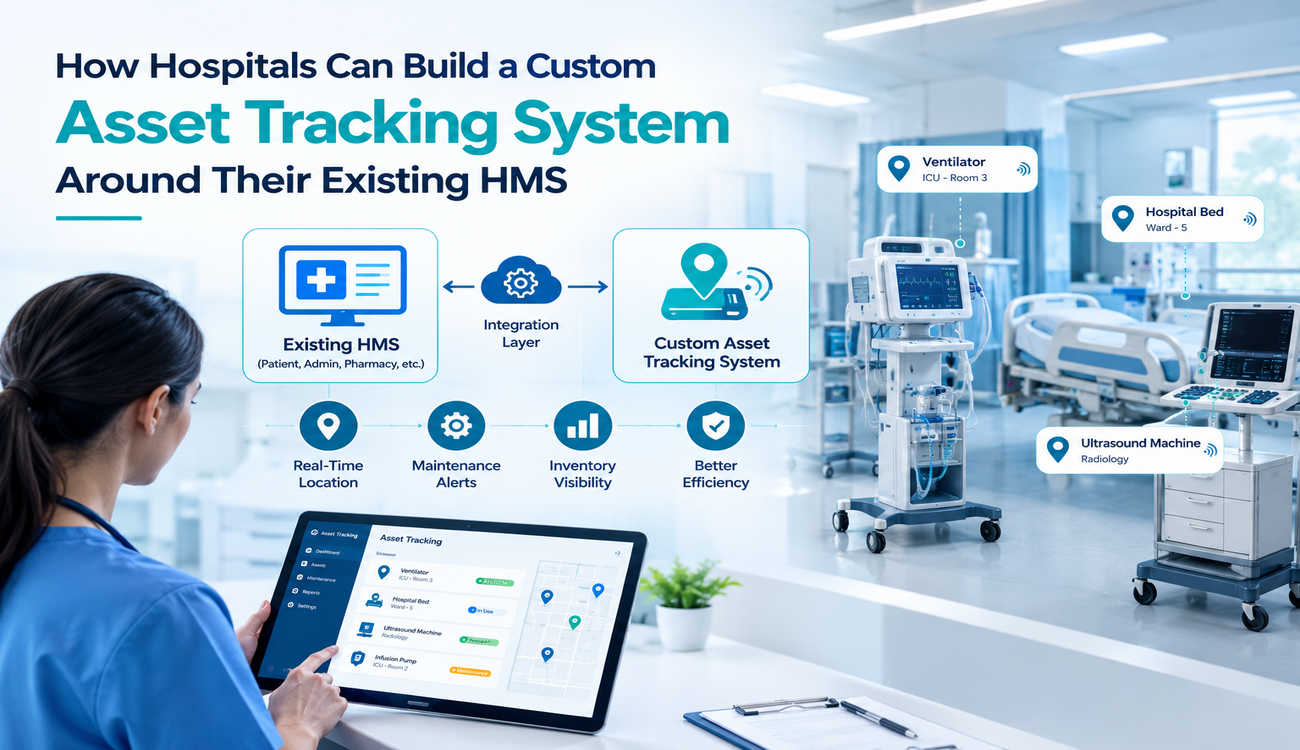
Hospitals depend on medical equipment, diagnostic devices, patient monitoring systems, infusion pumps, wheelchairs, and other essential assets to deliver safe and efficient patient care. A Healthcare Asset Tracking System helps hospitals monitor these assets, improve equipment visibility, and streamline inventory management. However, managing assets across multiple departments can become challenging when equipment moves frequently, inventory records are outdated, and staff members spend valuable time locating devices. These problems can delay clinical workflows, increase operational costs, and reduce the availability of equipment when patients need it most.
Many hospitals already use a Hospital Management System (HMS) to manage patient records, appointments, billing, pharmacy operations, and administrative activities. Instead of replacing this established infrastructure, hospitals can build a custom Healthcare Asset Tracking System that integrates with their existing HMS and improves visibility into the location, status, availability, and maintenance history of medical equipment.
A customized approach allows healthcare organizations to connect asset data with existing workflows while retaining their current systems. With the right combination of tracking technologies, software integration, and operational planning, hospitals can create a more reliable asset management process without disrupting day-to-day clinical activities.
What is a Healthcare Asset Tracking System?
A Healthcare Asset Tracking System is a technology-based solution that helps hospitals monitor, manage, and maintain equipment throughout its lifecycle. Depending on the hospital’s requirements, the system may use Radio Frequency Identification (RFID), Bluetooth Low Energy (BLE), Real-Time Location Systems (RTLS), barcodes, QR codes, GPS for suitable outdoor applications, or a combination of these technologies.
The system collects asset information and makes it accessible through a centralized dashboard. Hospital staff can check where an equipment item was last detected, whether it is available for use, when it requires maintenance, and which department is responsible for it.
When connected to an HMS, the tracking platform can exchange relevant information with existing hospital applications. For example, equipment availability may be displayed alongside departmental requests, while maintenance alerts can be routed to the biomedical engineering team. The integration creates a more connected operational environment without requiring the hospital to rebuild its entire technology infrastructure.
Why Hospitals Should Build Around Their Existing HMS
Preserve Existing Hospital Investments
Replacing an HMS can require substantial investment, employee training, data migration, and workflow changes. It may also introduce risks if critical departments depend on established processes that cannot easily be interrupted.
Building a tracking solution around the existing HMS allows hospitals to retain their current patient management and administrative infrastructure while adding specialized asset management capabilities. This approach can reduce unnecessary disruption and make implementation more manageable.
Address Hospital-Specific Requirements
Every hospital has different operational needs. A multispecialty hospital may require equipment tracking across emergency departments, intensive care units, operating theatres, laboratories, and inpatient wards. A smaller facility may prioritize portable diagnostic devices, wheelchairs, and maintenance schedules.
A custom solution can be designed around these requirements rather than forcing the organization to adapt to a generic asset management platform. The hospital can determine which assets need location tracking, which departments require access, and which notifications should be triggered automatically.
Improve Equipment Visibility
Equipment may move between departments, treatment rooms, storage areas, and maintenance facilities throughout the day. When these movements are not recorded consistently, hospital employees may spend time searching for devices or contacting other departments to confirm availability.
An integrated tracking platform can improve visibility by presenting current or last-detected asset information, depending on the technology used. This helps staff locate equipment more efficiently and supports better utilization of existing resources.
How to Build a Custom Healthcare Asset Tracking System Around an HMS
Step 1: Assess the Existing HMS and Asset Management Workflow
The first step is to understand how the hospital currently manages equipment. Before selecting hardware or developing software, the project team should examine the existing HMS, inventory records, procurement applications, maintenance tools, and departmental workflows.
The assessment should identify how assets are registered, how staff request equipment, how equipment movements are recorded, and how maintenance activities are scheduled. It should also reveal whether asset information is distributed across spreadsheets, standalone databases, or separate departmental applications.
Hospital IT teams, biomedical engineers, procurement staff, nursing representatives, and facilities managers should contribute to this assessment. Their input helps ensure that the proposed system addresses practical challenges rather than introducing another disconnected application.
Step 2: Define Asset Categories and Tracking Requirements
Not every hospital asset requires the same tracking method. High-value mobile equipment may need frequent location updates, while smaller consumables or fixed devices may only require inventory identification and periodic verification.
The hospital should classify assets according to their value, mobility, clinical importance, usage frequency, maintenance requirements, and risk of loss. This classification helps determine the appropriate tracking technology and the level of visibility needed for each category.
For example, RFID may support rapid inventory audits, BLE can provide room-level or zone-level location information when appropriately deployed, and barcodes can offer a cost-effective method for scanning assets at designated checkpoints. The final choice should depend on the required accuracy, building layout, interference conditions, infrastructure, and budget.
Step 3: Design the HMS Integration Architecture
Integration is the foundation of a custom solution. The tracking platform must exchange relevant information with the existing HMS without creating duplicate records or interfering with critical hospital operations.
A common architecture includes the tracking devices and sensors, a data collection layer, an asset management application, an integration layer, and the existing HMS. APIs or middleware can connect these components and manage communication between systems.
The integration layer may synchronize asset identifiers, department information, maintenance status, and other relevant records. The design should define which system acts as the source of truth for each data field. For example, the HMS may remain responsible for departmental information, while the tracking platform manages location events and equipment movement history.
Healthcare organizations should also consider interface compatibility, authentication, error handling, and audit logging. If the HMS offers limited integration capabilities, a carefully designed middleware service may help connect the systems without modifying the core application extensively.
Step 4: Select and Deploy the Tracking Technology
Once requirements and integration architecture are defined, the hospital can choose suitable tracking hardware. RFID readers, BLE beacons, barcode scanners, and compatible asset tags can be deployed according to the needs of different departments.
Hospitals should assess how walls, medical equipment, electromagnetic conditions, and room layouts affect signal performance. A technology that works well in an open warehouse may not provide the same results in a hospital with enclosed rooms and complex clinical environments.
A pilot deployment can help evaluate location accuracy, tag durability, battery life, network coverage, and staff usability. Testing should take place in representative hospital areas before the technology is expanded across the facility.
Step 5: Develop the Asset Tracking Dashboard
The dashboard should give authorized staff a clear view of the information they need to perform their responsibilities. A nursing team may need to check nearby equipment availability, while biomedical engineers may need maintenance schedules and fault reports.
The interface can include asset search, location history, department-wise inventory, maintenance alerts, asset utilization reports, and movement logs. Filters can help users locate equipment by category, identification number, department, or operational status.
A well-designed interface should be easy to use during busy hospital operations. Mobile access may be useful for authorized employees who need to scan equipment or update records while moving between departments.
Step 6: Configure Alerts and Maintenance Workflows
Tracking becomes more valuable when the system helps staff take action on the information it collects. Hospitals can configure alerts for overdue maintenance, equipment assigned to the wrong location, missing assets, or devices that have not been detected within an expected period.
For example, when an asset reaches a maintenance deadline, the system can create a service request or notify the biomedical engineering team. Once the work is completed, the maintenance status can be updated in the tracking platform and synchronized with relevant systems.
Alerts should be based on clear rules and realistic thresholds. Excessive notifications can overwhelm employees and reduce the likelihood that important warnings will receive timely attention.
Step 7: Pilot, Train, and Expand Gradually
Before a hospital-wide rollout, the solution should be tested in a selected department, such as radiology, intensive care, or emergency services. The pilot allows the project team to validate system performance and identify operational issues in a controlled environment.
Staff should receive practical training on asset searches, scanning procedures, status updates, and escalation workflows. The project team should also establish a process for reporting inaccurate records, malfunctioning tags, and integration failures.
After reviewing pilot results, the hospital can refine the configuration and extend the system to other departments. A phased rollout helps manage costs, reduces disruption, and allows lessons from early deployments to inform later stages.
Key Features to Include in a Custom Hospital Asset Tracking Solution
A useful tracking platform should support centralized asset registration, unique identification, location visibility, movement history, and department-level inventory management. It should also allow authorized employees to view equipment status and search for assets without navigating multiple disconnected applications.
Integration with maintenance workflows is another important capability. The system should help teams monitor inspection schedules, service requests, repair history, and equipment downtime. Reporting tools can provide insights into utilization patterns, frequently unavailable devices, and assets that may be underused or overburdened.
For hospitals with multiple buildings or campuses, the platform may also need location mapping, role-based dashboards, and scalable integration services. The exact feature set should be determined by clinical priorities, operational requirements, and the capabilities of the existing HMS.
Security and Compliance Considerations
Hospital asset data can reveal operational patterns, equipment locations, and information about how clinical departments function. Although asset tracking does not always require patient information, integration with hospital systems can introduce additional privacy and security considerations.
The architecture should follow the principle of least privilege, allowing employees to access only the functions and information required for their roles. Secure authentication, encryption, access logs, regular software updates, and network segmentation can help protect the system against unauthorized access.
Hospitals should minimize the exchange of patient information when it is not necessary for asset management. Where personal or health information is involved, the implementation must follow applicable privacy laws, healthcare regulations, contractual requirements, and the hospital’s internal security policies.
Testing should also cover system availability, data recovery, integration failures, and procedures for operating during network outages. These measures help ensure that asset visibility remains dependable without creating unnecessary risks for clinical operations.
How to Measure the Success of the System
Hospitals should establish baseline measurements before implementation so they can assess the actual impact of the new solution. Equipment search time is one useful indicator because it shows whether staff can locate devices more quickly after deployment.
Other relevant metrics for evaluating a Healthcare Asset Tracking System include asset utilization, equipment downtime, inventory accuracy, maintenance compliance, loss incidents, and the time required to complete inventory audits. The hospital can also measure how frequently staff need to contact other departments to locate equipment.
The results should be reviewed alongside implementation costs, hardware replacement, integration expenses, training, and ongoing support. A successful deployment should deliver measurable operational improvements while remaining practical to maintain and expand.
Common Challenges and How to Overcome Them
One challenge is inconsistent asset data. Duplicate records, missing identifiers, and outdated department assignments can undermine tracking accuracy. A data-cleaning exercise and standardized asset registration process should therefore precede deployment.
Another challenge is integration complexity. Older HMS platforms may have limited APIs or incomplete documentation. Hospitals can address this by assessing integration options early, using appropriate middleware, and testing data synchronization before going live.
Staff adoption is equally important. If employees do not follow scanning or movement-recording procedures where required, asset records may become unreliable. Clear responsibilities, intuitive interfaces, and practical training can help establish consistent practices.
Finally, tracking technology has physical limitations. RFID, BLE, and other methods differ in their accuracy and coverage, so hospitals should avoid assuming that every tag will provide precise, continuous room-level location information. Site surveys and pilot testing help determine realistic performance expectations.
Conclusion
Building a custom tracking platform around an existing HMS enables hospitals to improve equipment visibility without replacing the systems that already support their daily operations. By assessing current workflows, choosing appropriate tracking technologies, designing secure integrations, and involving hospital staff throughout implementation, healthcare organizations can create a solution that reflects their actual needs.
A well-planned Healthcare Asset Tracking System can help reduce equipment search time, improve inventory accuracy, support preventive maintenance, and make better use of existing medical resources. Its long-term value depends on reliable data, practical workflows, appropriate security controls, and continuous performance monitoring.
Hospitals should begin with clearly defined operational challenges, validate the solution through a pilot, and expand gradually as measurable benefits emerge. With the right implementation strategy, asset tracking can become a valuable extension of the existing HMS and contribute to more efficient hospital operations and better-supported patient care.
Frequently Asked Questions
Q1. What is a Healthcare Asset Tracking System?
A Healthcare Asset Tracking System is a technology solution that helps hospitals monitor the location, availability, usage, and maintenance of medical equipment. It can use RFID, BLE, RTLS, barcodes, or QR codes to improve asset visibility, reduce search time, and support efficient hospital operations.
Q2. Can a custom asset tracking system integrate with an existing HMS?
Yes, a custom asset tracking system can integrate with an existing Hospital Management System (HMS) through APIs, middleware, or other compatible integration methods. This allows hospitals to exchange relevant asset, department, and maintenance information without replacing their current HMS infrastructure.
Q3. Which tracking technology is best for hospitals?
The best technology depends on the hospital’s requirements, budget, building layout, and desired location accuracy. RFID is useful for inventory audits, BLE can support indoor location tracking, and barcodes or QR codes provide a cost-effective option for manual scanning. Some hospitals combine multiple technologies for better results.
Q4. What are the main benefits of integrating asset tracking with an HMS?
Integration improves equipment visibility, reduces the time staff spend locating devices, supports preventive maintenance, and improves inventory accuracy. It can also help hospitals monitor equipment utilization, streamline departmental workflows, and make better use of existing medical resources.
Q5. How can hospitals implement an asset tracking system without disrupting operations?
Hospitals can begin by assessing their existing HMS, identifying tracking requirements, and selecting a suitable technology. A pilot deployment in one department allows teams to test integrations, train employees, and resolve issues before expanding the solution across the hospital. A phased rollout helps minimize disruption and manage implementation costs.
